Click here for Click! Recorder version 2.
Click! Recorder | Full-Automatic Help / Manual Authoring And Screen Capture Software |
If you ever...
- Capture several screen shots
- Author step-by-step help, manual, or test script
- Teach how to use software at school, to colleagues, or even to your parents
Click! Recorder is the software for you!!
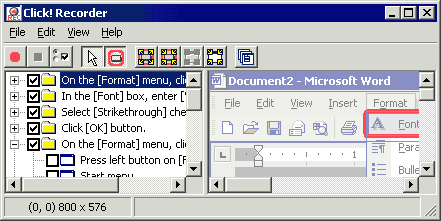
All you have to do is to click the record button before you use your software. Click! Recorder will capture all necessary screen shots, and will also create a help text for you. See samples and you will be surprised!
- Software help authoring and/or manual authoring
- Authoring text for your PC classes
- Reproducible steps for bug reports
- Explain steps at your support desk
- Teach software to your colleagues and families
After recording, you can also change the size of the captured screen shots, show or hide mouse cursors, highlight buttons, and more!!
Automatic Authoring—Just Use Your Software
Click! Recorder monitors what you do with your software, and captures all the necessary screen shots automatically.
Click! Recorder also monitors any changes on the screen and captures screen shots as well.
Captures Not Only Screens, But Also Texts
Text-only or screen shots-only manuals are often not helpful. Click! Recorder captures both for you.
Look at our samples and you will be surprised how much work Click! Recorder does for you.
 Text quality may vary by the application being
captured.
Text quality may vary by the application being
captured.Structured Capture Function Helps You To Edit Screen Shots
Click! Recorder captures not only images, but also their window structures. For example, Click! Recorder can recognize the location and the size of any buttons. Highlighting a button is just a click away on the Click! Recorder toolbar button!
Mouse cursors are captured in a separate layer, so you can show, hide, or even move them to wherever you want.

Microsoft Word, HTML, and More Export Options
Captured text and screen shots can be exported to Microsoft Word or HTML. You can choose layouts, or even create your own templates.
Image formats such as BMP, GIF, JPEG, TIFF, and PNG are also supported.
MS Word Add-In to Change the Scale of Captured Images
For even easier help and manual authoring, Click! Recorder comes with a Microsoft Word Add-In to change the size of captured images. Once you have exported the captured images and texts to Word, you do not have to go back to Click! Recorder.
Download Our Free Trial Now!
With our free trial program, you can experience how much of your time Click! Recorder saves, and why so many developers, help authors, manual authors, technical writers, and PC class teachers are using this software!